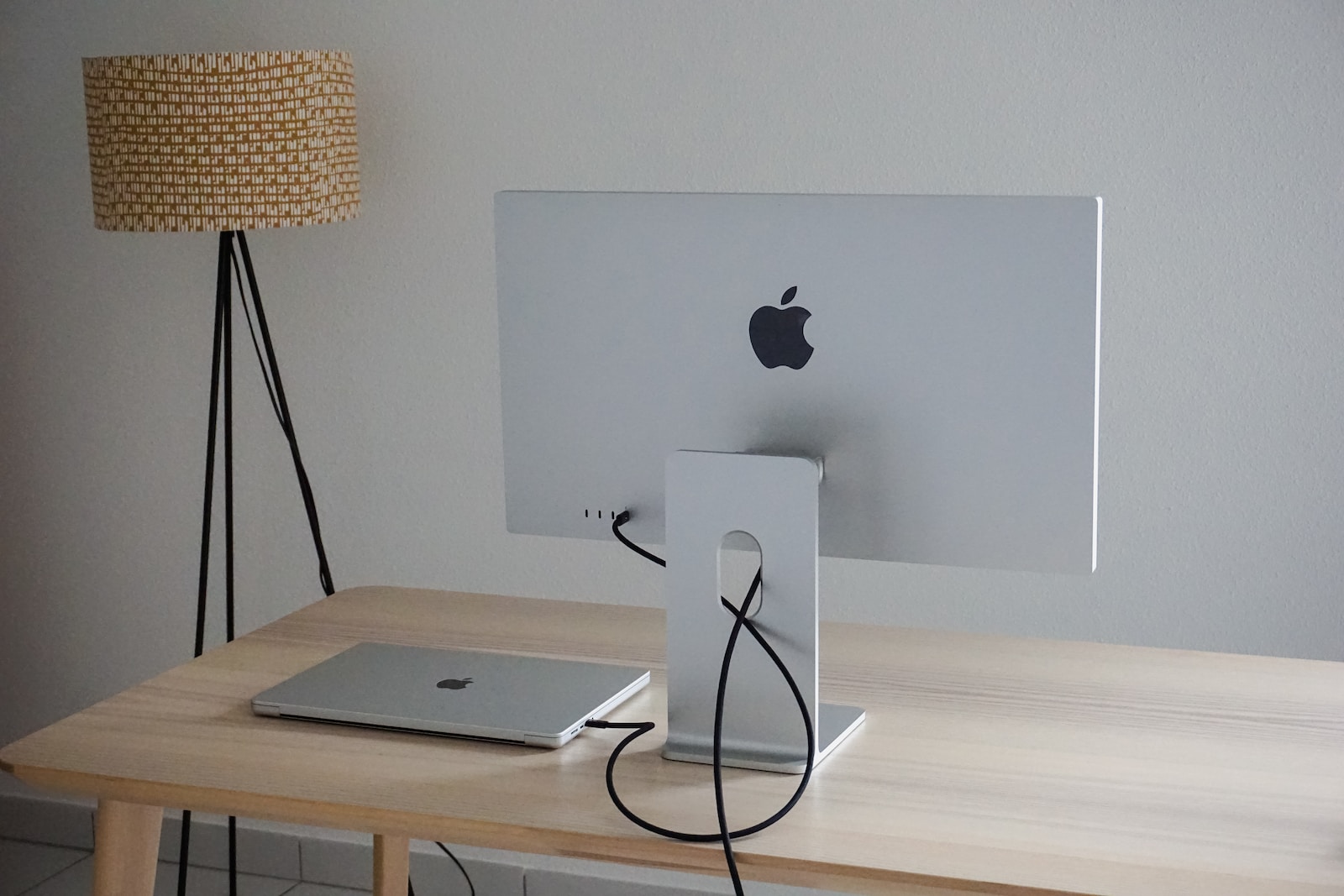
The Apple Studio Display is one of the most polarizing monitors in the professional market — not because of its quality, which is genuinely exceptional, but because of its price.
At $1,599 USD for the standard configuration, the Apple Studio Display costs more than many complete computer setups. It competes with professional monitors from Dell, LG, and BenQ that deliver comparable display performance at significantly lower prices.
The question this review answers is specific: for which professionals is the Apple Studio Display genuinely worth $1,599 — and for which professionals is a less expensive alternative the more rational choice?
After extended professional use, the answer is clearer than the price might suggest.
Specifications
| Specification | Detail |
|---|---|
| Screen size | 27 inches |
| Resolution | 5K Retina (5120 × 2880) |
| Pixel density | 218 PPI |
| Brightness | 600 nits sustained / 1000 nits (HDR) |
| Color gamut | P3 wide color |
| Color accuracy | True Tone, 10-bit dithering |
| Refresh rate | 60Hz |
| Camera | 12MP Ultra Wide with Center Stage |
| Microphone | Studio-quality three-mic array with directional beamforming |
| Speakers | High-fidelity six-speaker sound system with Spatial Audio |
| Connectivity | Thunderbolt 3 (96W host charging) + 3× USB-C (USB 3.1 Gen 2) |
| Stand adjustment | Tilt (−5° to +25°) |
| VESA mount | Optional (replaces stand, separate purchase) |
| Price | $1,599 USD (standard glass) / $1,899 USD (nano-texture glass) |
Display Quality: Where the Studio Display Earns Its Price
The 27-inch 5K Retina display is the Apple Studio Display’s defining feature — and it is genuinely excellent.
At 218 pixels per inch, text and images are sharp to the point where individual pixels are indistinguishable at normal viewing distances. For professionals who read and write extensively — consultants drafting documents, developers reviewing code, analysts working through spreadsheets — the clarity difference from a standard 1080p or even 4K monitor is immediately visible and remains noticeable after months of use.
Color accuracy: The P3 wide color gamut and True Tone technology produce colors that are accurate, consistent, and naturally calibrated to ambient lighting. For photography, video editing, and design professionals whose work depends on color accuracy, the display performs to professional standards without requiring manual calibration.
Brightness: 600 nits of sustained brightness is adequate for typical office environments. The 1000-nit HDR mode delivers vivid highlights on supported HDR content. For professionals who frequently work near windows or in brightly lit environments, the brightness is sufficient — not exceptional.
The nano-texture glass option: The $1,899 configuration replaces standard glass with nano-texture glass — a matte-finish treatment that diffuses reflections without the haze typical of anti-glare coatings on other monitors. For professionals whose workspace has unavoidable bright light sources or window reflections, the nano-texture upgrade meaningfully improves usability. For controlled lighting environments, the standard glass is adequate.
The Built-In Camera, Microphone, and Speakers
The Apple Studio Display includes functionality that competing monitors at this price point do not: a genuinely capable integrated camera, professional-quality microphones, and a high-fidelity speaker system.
12MP Ultra Wide camera with Center Stage: The 12MP camera — using the same sensor found in recent iPad models — is the best integrated webcam available in any monitor. Center Stage automatically keeps you centered in the frame as you move, using on-device processing to track your position without cloud connectivity.
For remote professionals who conduct video calls frequently, this eliminates the need for a separate external webcam — saving $70–$300 depending on which webcam you would otherwise purchase. The camera quality is noticeably better than the built-in cameras on most MacBook models.
Three-microphone array with directional beamforming: The Studio Display’s microphone array uses directional beamforming to focus on your voice and reduce background noise — producing call audio quality that competes favorably with dedicated USB microphones.
For professionals who currently use a separate USB microphone for call quality, the Studio Display’s integrated microphones are a legitimate alternative that eliminates desk clutter.
Six-speaker sound system with Spatial Audio: The built-in speaker system is the best available in any monitor — producing audio quality that rivals standalone desktop speakers in the $100–$200 range. For professionals who want clean desk audio without a separate speaker system, the Studio Display delivers it.
The integrated value argument: Adding a quality webcam ($150), USB microphone ($80), and desktop speakers ($150) to a competing monitor costs approximately $380 — reducing the effective price premium of the Studio Display to approximately $300–$400 over a comparable 5K alternative with equivalent display quality.
Connectivity
The Apple Studio Display’s connectivity reflects Apple’s ecosystem priorities rather than maximum versatility.
Thunderbolt 3 (one port): The primary connection to your Mac. A single Thunderbolt 3 cable delivers video, data, and up to 96W of charging power to a connected MacBook Pro — sufficient to charge the MacBook Pro 14″ at full speed while powering the display.
This single-cable connection is the Studio Display’s most practically valuable feature for MacBook users. Connect one cable, and your laptop charges, drives the display, and connects to all peripherals simultaneously.
Three USB-C ports (USB 3.1 Gen 2): Three USB-C ports on the back of the display handle peripherals — external drives, hubs, and accessories. These are not Thunderbolt ports — they do not deliver the bandwidth of the primary Thunderbolt 3 connection — but are adequate for most peripheral use cases.
What is missing: No HDMI. No DisplayPort. No USB-A ports. No SD card reader. No Ethernet.
The absence of HDMI and DisplayPort means the Apple Studio Display is exclusively compatible with Macs and PCs with Thunderbolt 3 or USB-C video output. Windows users with HDMI-only graphics cards cannot connect to this display.
For Mac users — the primary target audience — this limitation is largely irrelevant. For professionals who use both Mac and Windows machines and want a single monitor that works with both, this is a genuine constraint.
Stand and Ergonomics
The Studio Display’s included stand offers tilt adjustment from −5° to +25° — and that is the extent of its ergonomic adjustability.
There is no height adjustment on the standard stand. No swivel. No pivot for portrait orientation.
For professionals whose seated eye height does not naturally align with the display’s fixed height, this is a significant ergonomic limitation. A monitor arm resolves it — but the Studio Display uses a proprietary VESA adapter sold separately ($199), which also requires removing the included stand at the time of purchase. You cannot add the VESA adapter after purchasing the standard configuration.
This inflexibility is the most legitimately criticized design limitation of the Apple Studio Display — particularly at $1,599, where adjustable ergonomics are a reasonable expectation.
Practical guidance: Before purchasing, verify that the Studio Display’s fixed height is appropriate for your seated eye height. If your desk and chair combination positions your eyes significantly above or below the center of a 27-inch monitor at its fixed height, either the VESA adapter with a third-party monitor arm or an alternative monitor with height adjustment is the more practical choice.
Mac Compatibility and Apple Ecosystem Integration
The Apple Studio Display is engineered for the Apple ecosystem — and its integration advantages are most apparent in daily professional use.
True Tone adaptation: True Tone adjusts the display’s color temperature based on ambient lighting — reducing the perceptual color shift between the warm tones of indoor incandescent lighting and the cooler tones of natural daylight. The adjustment is subtle and continuous, reducing eye strain over extended sessions without being noticeable as a discrete change.
Automatically adjusting brightness: The display’s ambient light sensor adjusts brightness automatically — maintaining appropriate luminance for current lighting conditions without manual adjustment.
Center Stage on video calls: The camera’s Center Stage feature integrates with FaceTime, Zoom, Teams, Google Meet, and other video conferencing applications on Mac. The automatic tracking works across all applications — not only Apple’s own software.
Windows compatibility: The Apple Studio Display connects to Windows computers via Thunderbolt 3 or USB-C — the display functions as a monitor. However, the camera, microphone, and True Tone features require Apple Silicon or Intel Mac — they do not function on Windows. For Windows users, the display delivers the screen but not the integrated camera and microphone benefits that justify much of its premium.
Who Should Buy the Apple Studio Display
Strong case for purchase:
Mac professionals who conduct frequent video calls: The combination of the 5K display, 12MP Center Stage camera, and studio-quality microphones eliminates three separate purchases — external webcam, USB microphone, and potentially desktop speakers — while delivering each at a quality level that competes with dedicated alternatives.
Photography and video professionals on Mac: The P3 wide color gamut, 218 PPI pixel density, and accurate color reproduction deliver professional display performance for color-critical work without requiring separate monitor calibration.
MacBook users who want single-cable desk connectivity: The Thunderbolt 3 single-cable connection — delivering video, charging, and peripheral connectivity simultaneously — reduces desk cable complexity to a single connection and disconnection.
Professionals building a long-term Mac workspace: The Studio Display is a durable, well-built monitor that Apple will support with software updates for years. For professionals who change computers frequently but want their display to persist across multiple Mac generations, the build quality and longevity argument is legitimate.
Weaker case for purchase:
Windows users: The camera and microphone — which justify much of the premium — do not function on Windows. The display itself works, but the value proposition collapses without integrated camera and microphone functionality.
Professionals prioritizing ergonomics: No height adjustment on the standard stand is a genuine limitation at this price point. If ergonomic flexibility is important to your setup, the VESA adapter adds $199 and requires planning at time of purchase.
Budget-conscious professionals: The LG UltraFine 5K at $1,299 and the Dell UltraSharp 27-inch 4K at $449–$529 deliver comparable display quality for professional work at significantly lower prices. Unless the integrated camera, microphone, and speakers are specifically valuable to your workflow, these alternatives represent better value.
Professionals who need USB-A ports or an SD card reader: The Studio Display’s USB-C-only connectivity requires adapters or a hub for USB-A peripherals and SD cards — adding cost and complexity.
Competing Alternatives Worth Considering
| Monitor | Resolution | Webcam | Price | Best For |
|---|---|---|---|---|
| LG UltraFine 5K | 5K | Basic | $1,299 | Budget 5K alternative |
| Dell UltraSharp U2723D | 4K | None | $449–$529 | Value professional monitor |
| LG 27UN880-B Ergo | 4K | None | $449–$499 | Best ergonomic alternative |
| BenQ PD2725U | 4K | None | $699 | Design professional alternative |
The LG UltraFine 5K — discontinued by LG but available on the secondary market — delivers comparable 5K display quality to the Studio Display at lower cost, without the integrated camera, microphone, and speaker quality. For Mac professionals whose primary interest is the display panel and who are comfortable sourcing a webcam separately, it is worth considering if available.
The Dell U2723D at $449–$529 is the most compelling alternative for professionals who do not specifically need 5K resolution — delivering professional-grade 4K IPS display performance with a 5-year Dell warranty at roughly one-third of the Studio Display’s price.
Pricing
Apple Studio Display — Standard glass with tilt-and-height stand: $1,599 USD Apple Studio Display — Nano-texture glass with tilt-and-height stand: $1,899 USD Apple Studio Display — Standard glass with VESA mount adapter: $1,599 USD (stand not included, ordered separately)
Available directly from Apple (apple.com) and Amazon. Canadian pricing through Apple Canada — verify current CAD pricing at apple.com/ca.
FAQ
Does the Apple Studio Display work with Windows computers? The display connects via Thunderbolt 3 or USB-C and functions as a monitor on Windows. However, the camera, microphone, True Tone, and automatically adjusting brightness features require a Mac. Windows users receive only the display panel — not the integrated functionality.
Can I add height adjustment after purchasing? No. The VESA adapter must be selected at the time of purchase — it replaces the included stand and cannot be added afterward. If you want height adjustment flexibility, either select the VESA adapter at purchase (and source a compatible monitor arm separately) or choose a monitor with a height-adjustable stand.
Does it work with the MacBook Air? Yes — the MacBook Air M3 connects via USB-C to the Studio Display, receiving video output and up to 96W charging. All integrated features including Center Stage, microphone, and speakers function normally.
Is the 5K resolution meaningfully better than 4K for professional work? At 27 inches, 5K (218 PPI) delivers noticeably sharper text and image detail than 4K (163 PPI) at the same screen size. For professionals who read and write extensively, the difference is visible and reduces eye strain over long sessions. For professionals who primarily use an external monitor for reference rather than extended focused work, the difference is less impactful.
How does the camera compare to dedicated webcams? The 12MP Center Stage camera is comparable to the Logitech MX Brio ($199) in image quality — meaningfully better than the Logitech C920s ($79) and significantly better than any laptop built-in camera. For professionals who would otherwise purchase a quality external webcam, the Studio Display camera is a legitimate replacement.
Conclusion
The Apple Studio Display is an excellent monitor — genuinely excellent, not merely expensive. The 5K Retina panel, integrated camera, microphone array, and speaker system represent a cohesive professional workspace tool that eliminates multiple separate purchases while delivering each component at a quality level that competes with dedicated alternatives.
Its value is most clear for Mac professionals who conduct frequent video calls, work with color-critical content, and want the clean single-cable desk setup that Thunderbolt 3 connectivity enables. For this profile, the $1,599 price reflects the combined value of the display, webcam, microphone, and speakers — not merely the panel.
Its value is least clear for Windows users who receive only the display panel, for professionals who prioritize ergonomic adjustability, or for those whose work does not specifically benefit from 5K resolution or integrated video call hardware.
Buy it if the integrated ecosystem justifies the premium for your specific workflow. Choose a well-specified Dell or LG alternative if it does not.


Comments